
Grow To Eat vs Almanac Garden Planner: which is right for you?
Grow To Eat is a tool that helps you each day in the garden: a native iOS and Android app, focused only on edible crops, that tells you what needs doing this week. The Almanac Garden Planner is a plot design tool for a desktop browser — 250+ plants, crop rotation and spacing warnings, garden structures — with no app to take out to the beds.
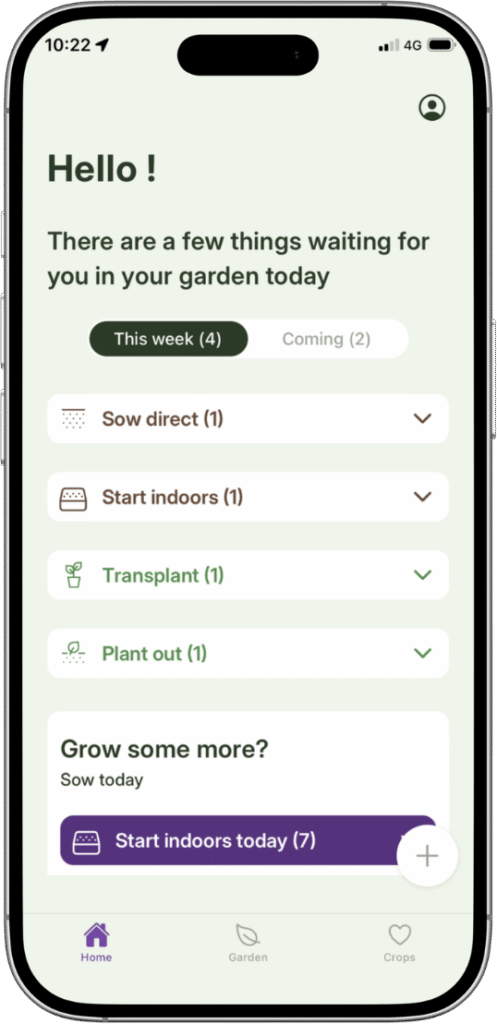
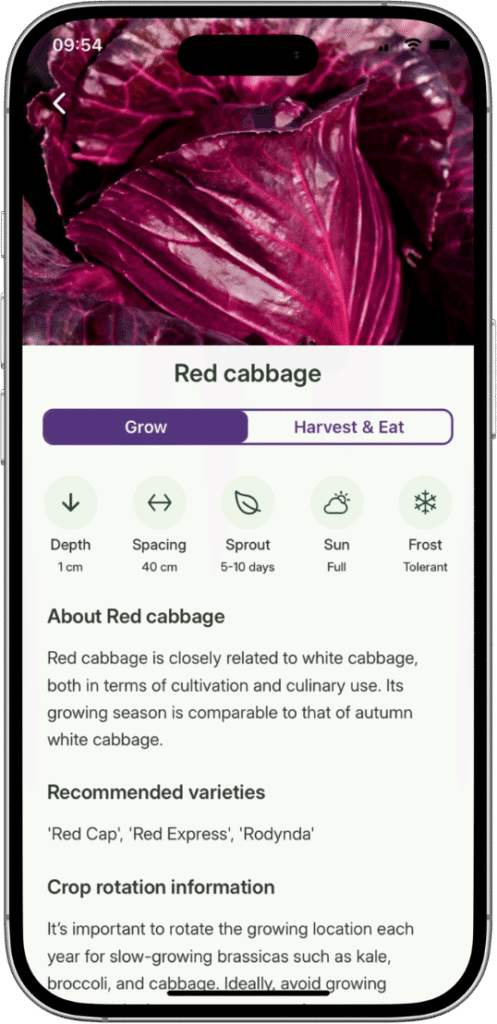
Grow To Eat is built for the actual growing season. Sowing dates from your own location, a weekly view of what to sow, tend and pick, harvest tracking, and 120+ edible crops with a full growing guide behind each one — on the phone that is already in your hand when you are standing at the bed.
The design side of the Almanac planner is powerful, and the Old Farmer’s Almanac name carries real weight: 250+ plant types, crop rotation warnings, automatic spacing, nearly 200 garden objects, Garden Guru video tutorials and access to gardening experts, for $35 a year after a 7-day trial. All of it lives in a web browser, and it stays there — there is no iPhone or Android app, so to reach your plan or your notes out at the beds you are logging in to a website on your phone.
At a glance
What they share
- ✓A visual drag-and-drop garden bed planner
- ✓Planting dates personalised to where you garden
- ✓Companion planting guidance
- ✓Succession planting to keep beds producing
- ✓Step-by-step growing guidance for each crop
- ✓A free way to try it before paying
Where Grow To Eat differs
- ●A native app on both iPhone and Android, not a browser tool
- ●A weekly “what to do now” view: sowings, next steps and harvests together
- ●Harvest tracking, so you can see what is still to come
- ●Built only for edible crops — no ornamentals to wade through
- ●A free tier that never expires, rather than a 7-day trial
- ●Crop suggestions filtered by shade, pollinator value and difficulty
Grow To Eat vs Almanac Garden Planner: feature comparison
| Feature | Almanac Garden Planner | Grow To Eat |
|---|---|---|
| Once the season starts | ||
| Weekly “what to do now” view | Partial | ✓ |
| Task list for what's due | Journal, in a browser | In the app |
| Harvest tracking | Journal, in a browser | In the app |
| Reminders for what's next | You set them, plus a twice-monthly email | Worked out from your sowing dates |
| Succession planting for continuous harvest | ✓ | ✓ |
| Crop rotation warnings | ✓ | – |
| Plant spacing warnings | ✓ | – |
| What you can grow | ||
| Focus | Whole garden | Edible crops only |
| Plant types in the library | 250+ incl. flowers | 120+ edible crops |
| Named varieties built in | Yes — from seed suppliers | No — by design, you add your own |
| Crop filters (shade, pollinators, difficulty) | – | ✓ |
| A–Z guides: propagation to preservation | Partial | ✓ |
| Where and how you use it | ||
| Personalised planting dates | Yes — 5,000 weather stations | Yes — your location |
| Where it works | Global, both hemispheres | Northern hemisphere |
| How you use it | In a web browser, or PC/Mac | Native iPhone and Android apps |
| What it costs | ||
| What's behind the paywall | Everything — there is no free tier | Garden planner, succession planting, custom crops |
| Free tier | None — 7-day trial, no card | Uncapped sowing plan + all guides |
| Yearly price | $35 recurring / $50 one year | €44.99 |
Prices and features checked August 2026. Almanac Garden Planner pricing shown in USD, Grow To Eat in EUR. Prices shown in the currency each app charges in.
A garden planner that lives in your pocket
Free sowing plans and full A–Z growing guides. No credit card required.
The key differences explained
A phone in the garden, or a browser at the desk
The Almanac Garden Planner runs in a web browser, with a PC and Mac version. It is built for a big screen and a mouse: dragging beds around, laying out fencing and irrigation, checking rotation across years. For an evening of planning in January that is the tool to have open.
A bigger library is the right answer for designing a whole garden. A narrower one is the right answer if what you want daily support for growing vegetables in your garden.
A whole garden, or the edible part of it
The Almanac planner covers 250+ vegetables, herbs, fruit and flowers, with named varieties from seed suppliers and nearly 200 objects for fencing, irrigation and season extenders. If you are designing a whole garden — borders and vegetable patch together — that breadth is the reason to choose it.
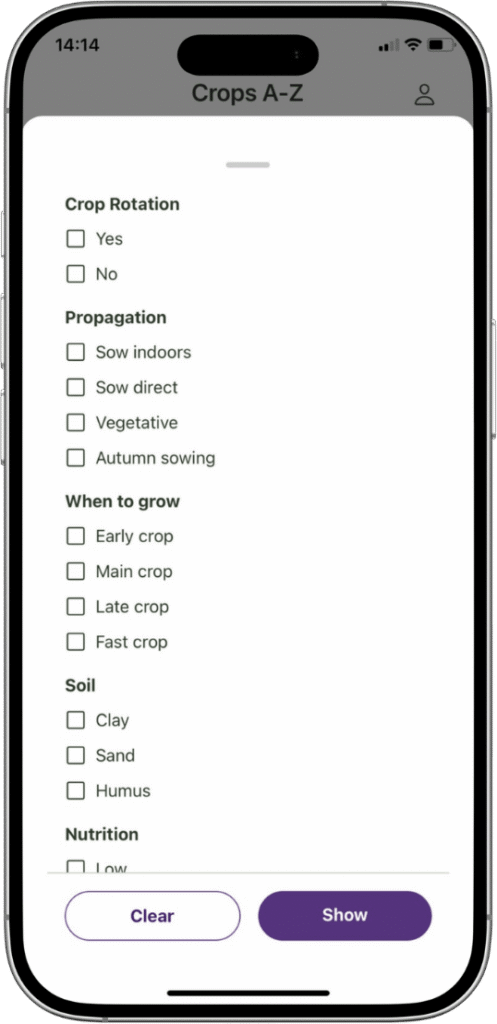
Grow To Eat carries 120+ crops and every one of them is food. Nothing ornamental, nothing you cannot eat. That makes the library smaller and the choosing faster, and it is why the crop filters ask what a food grower actually asks: what will crop in partial shade, what feeds pollinators, what is forgiving in a first season.
Bigger is genuinely better for designing a garden. Narrower is better if you only want to eat what you grow.
What you get without paying
The Almanac Garden Planner gives you 7 days free, with no credit card required, and then closes unless you subscribe: $35 a year recurring, $50 for a single year, or $85 for two. There is no permanent free tier.
Grow To Eat’s free tier does not expire. Your sowing plan, the weekly view, the full A–Z growing guides and the crop filters stay open for as long as you want them, with no cap. Premium adds the garden planner — drag-and-drop beds, the bed-by-bed overview and succession planting — at €7.49/month or €44.99/year.
On annual price the two are close: $35 against €44.99. The difference is that one of them still does something for you if you stop paying.
Know what to do in the garden this week
Free to start on iPhone and Android. Upgrade any time.
Choose Almanac Garden Planner if…
- You want to design a whole garden, not just the edible part
- You want crop rotation and spacing warnings doing the thinking for you
- You plan at a computer and like room to work
- You value the Almanac's videos and expert support
- You garden in the southern hemisphere
Choose Grow To Eat if…
- You want a real app on your phone, out in the garden
- You want to open it and see what needs doing this week
- You are growing food and don't need ornamentals in the way
- You want to keep using it for free rather than subscribe to start
- You want harvest tracking, not just a plan you drew in winter
Grow To Eat vs Almanac Garden Planner: the bottom line
Grow To Eat is the one you will open every day. A native app on iPhone and Android, edible crops only, sowing dates from your own location, a weekly view of what to sow, tend and pick, and harvest tracking — used standing in the garden rather than sitting at a desk. It stays free for as long as you want it to.
For designing the plot there is more in the Almanac Garden Planner: crop rotation warnings, automatic spacing, a bigger library, garden structures and both hemispheres covered. What it does not have is an app to carry out to the beds — the plan is made in a browser, and what follows is an email twice a month and a journal you keep yourself.
So the question is which half of the job you want help with: drawing the garden once, or growing it every week.
Frequently asked questions
Which is better, Grow To Eat or the Almanac Garden Planner?
Which app can I use in the garden?
What do you get on each free tier?
Which is cheaper?
Can an app tell me what to do in the garden each week?
Which has more plants?
Is the Almanac Garden Planner the same as GrowVeg?
Does Grow To Eat have crop rotation?
Is the Almanac Garden Planner free?
What are the best Almanac Garden Planner alternatives?
Grow To Eat is built for growing food, on the phone already in your hand.
Free sowing plans and growing guides. No credit card required.
Head-to-head comparisons
Last updated: August 2026