
Grow To Eat vs Gardenize: which garden app is right for you?
Grow To Eat builds a sowing plan from your location and shows you what to sow, tend and pick this week. Gardenize is a garden diary — plants, areas and dated events, kept with photographs — built to remember what you grew rather than to work out what comes next.
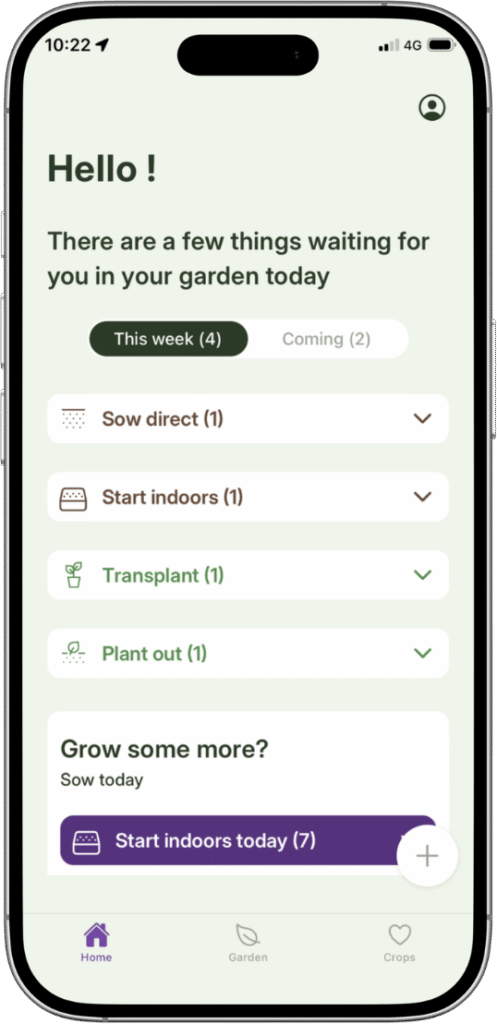
Grow To Eat is built for the season ahead. Sowing dates worked out from where you garden, a weekly view of what to sow, tend and pick, harvest tracking, and 120+ edible crops with a full A–Z guide behind each one.
Gardenize comes at the garden from the other end: what you planted, where it went, and what you did to it, kept with photographs and searchable years later. It carries over 45,000 species, runs on iPhone, Android and the web in eight languages, and sends reminders you set yourself. What it does not do is build a sowing plan for your garden.
At a glance
What they share
- ✓Native iPhone and Android apps
- ✓A record of what you planted and where you planted it
- ✓Notes against a plant
- ✓Harvest logged as you pick
- ✓Guidance tuned to where you garden
- ✓A free tier that does not expire
Where Grow To Eat differs
- ●A sowing plan worked out from your location, not a diary you fill in
- ●A weekly “what to do now” view: sowings, next steps and harvests together
- ●Dates that move with you when you sow late
- ●Built only for edible crops — no ornamentals to wade through
- ●A drag-and-drop bed planner — Gardenize has no layout tool
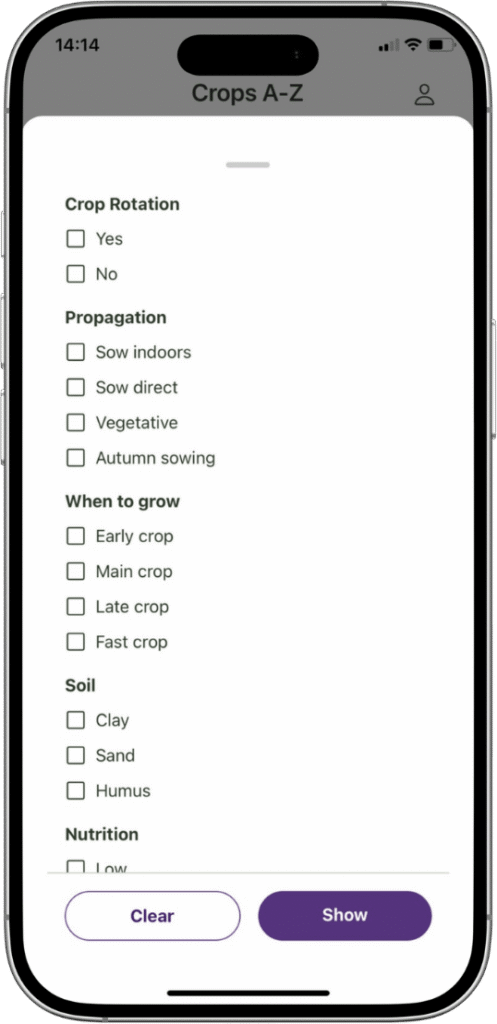
- ●Crop suggestions filtered by shade, pollinator value and difficulty
Grow To Eat vs Gardenize: feature comparison
| Feature | Gardenize | Grow To Eat |
|---|---|---|
| Once the season starts | ||
| Weekly “what to do now” view | – | ✓ |
| Dates shift when you sow late | – | ✓ |
| Succession planting for continuous harvest | – | ✓ |
| Harvest tracking | Logged as an event | Mark a crop harvested |
| Reminders for what's next | Recurring, set by you | In-app, worked out from your sowing dates |
| Garden journal with photos | ✓ | – |
| What you can grow | ||
| Focus | Every plant in the garden | Edible crops only |
| Plants in the library | 45,000+ species | 120+ edible crops, all food |
| A–Z guides: propagation to preservation | Care tips per plant | ✓ |
| Crop filters (shade, pollinators, difficulty) | – | ✓ |
| Where and how you use it | ||
| Personalised planting dates | Care advice by hardiness zone | Sowing dates from your location |
| Drag-and-drop bed planner | – | ✓ |
| How you use it | iPhone, Android and the web | Native iPhone and Android apps |
| Languages | 8, including Swedish | English |
| Gardens you can create | Several on one account | One, with unlimited beds |
| Export your data | PDF, spreadsheet, photo gallery | – |
| Where it works | Global, both hemispheres | Northern hemisphere |
| What it costs | ||
| What's behind the paywall | Photos beyond one per plant, the web app, export | Garden planner, succession planting, custom crops |
| Free tier | Unlimited plants and events, one photo each | Uncapped sowing plan + all guides |
| Yearly price | $1.90/mo Basic · $44/yr Plus | €44.99 |
Prices and features checked September 2026. Gardenize pricing shown in USD, Grow To Eat in EUR. Gardenize features and pricing taken from gardenize.com and its App Store listing, September 2026. Prices shown in the currency each app charges in.
A sowing plan for the year ahead
Free sowing plans and full A–Z growing guides. No credit card required.
The key differences explained
A record of the garden you had, or a plan for the one you want
Gardenize is organised around your plants, your garden areas, and a diary of dated events with photographs. Log what you planted and what you did to it, and years later you can search back and find when that apple tree last fruited or which tomato actually cropped. For remembering a garden, that is the tool.
It is not silent during the season either. You can set a reminder on any event and make it recurring — daily on the free tier, weekly, monthly or yearly on Plus — and there is a calendar of to-dos alongside a regional garden calendar of monthly tips.
The difference is who does the work. Grow To Eat starts from your location, sets your sowing dates, and works everything after them — potting on, planting out, first harvest — from the day you actually sowed. Sow a fortnight late and the rest of that crop’s dates move with you. Open the app and this week’s sowings, next steps and harvests are already there, for crops you have not thought about since March. Gardenize reminds you of the things you added in your manual list.
One app answers what did I do. The other answers what should I do now.
Every plant in the garden, or only the ones you eat
Gardenize carries over 45,000 species — annuals, perennials, shrubs and trees, the whole garden — with care notes adjusted to your hardiness zone. If you want one place to hold the roses, the hedge and the vegetable patch together, that breadth is the reason to choose it.
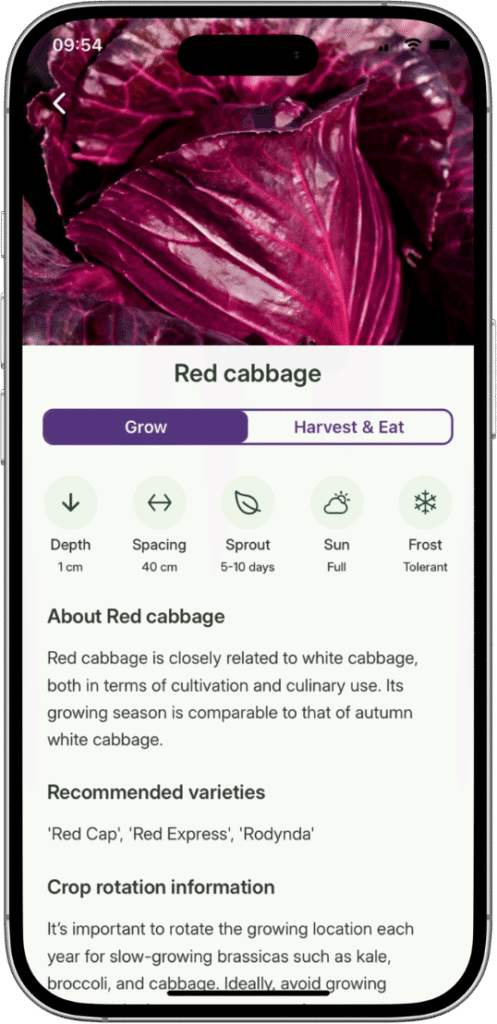
Grow To Eat carries 120+ crops and every one is food: vegetables, herbs, edible flowers, berries and berry bushes, and the kitchen-garden perennials. Nothing ornamental, no trees. Against 45,000 that is not a library contest and is not meant to be — it is the difference between an app that catalogues a garden and one that plans the part of it you eat.
It is also why the filters ask the questions a food grower asks: what will crop in partial shade, what feeds pollinators, what is forgiving in a first season. And behind each of those 120+ crops is a full A–Z guide — sowing, spacing, feeding, common problems, when to pick, and how to store or preserve what you pick.
What you get without paying
The two free tiers are shaped differently, and which is more generous depends on what you want from it.
Gardenize gives you unlimited plants, areas and events free, which is a lot for a journal — but one photo per plant, per area and per event, and photographs are the point of the app. The web version, editing images and export all sit behind Plus, at $4.40 a month or $44 a year, with Basic at $1.90 a month in between.
Grow To Eat’s free tier has no caps on the part that matters: your whole sowing plan, the weekly view, harvest tracking, every A–Z growing guide and the crop filters, for as long as you want them. Premium adds the drag-and-drop bed planner, succession planting and your own custom crops, at €7.49 a month or €44.99 a year.
For a year of the full product the two land close — €44.99 against $44 — so the question is not which is cheaper, but which free tier leaves out the thing you came for.
Know what to do in the garden this week
Free to start on iPhone and Android. Upgrade any time.
Choose Gardenize if…
- You want a photographic record of your garden, year after year
- You are looking after a whole garden, not just the edible part
- You want reminders you set yourself, arriving on your phone
- You want your garden data out as a PDF or a spreadsheet
- You want the app in Swedish, German, French or Spanish
- You want to plan on a laptop as well as a phone
- You garden in the southern hemisphere
Choose Grow To Eat if…
- You want to be told what to sow this week, rather than write down what you sowed
- You are growing food and don't need ornamentals in the way
- You want the dates after sowing to move when you sow late
- You want a full growing guide behind every crop, free
- You want succession planting so beds keep producing
- You want to draw your beds and see what is in each one
Grow To Eat vs Gardenize: the bottom line
Grow To Eat is the one that tells you what to do next. Sowing dates from your own location, a weekly list of what to sow, tend and pick, dates that move when you sow late, and 120+ edible crops with a full growing guide behind each — free, and uncapped.
Gardenize has unlimited plants, areas and events with photographs, 45,000+ species, a web app, eight languages, export, and more than one garden. What it isn’t is an app that will help you plan the growing season for your vegetables, herbs, edible flowers and berries.
So the question is which half of the job you want software for: remembering what you have planted in your garden, or planning and growing your vegetable garden throughout the season.
Frequently asked questions
Which is better, Grow To Eat or Gardenize?
Does Gardenize tell you when to sow?
Which has more plants?
What do you get on each free tier?
Which is cheaper, Grow To Eat or Gardenize?
Is Gardenize free?
Does Grow To Eat have a garden journal with photos?
Can two people share a garden?
Is Gardenize worth it?
What are the best Gardenize alternatives?
Grow To Eat works out the next step for every crop you sow.
Free sowing plans and growing guides. No credit card required.
Head-to-head comparisons
Last updated: September 2026