
Grow To Eat vs VegPlotter: which garden planner is right for you?
Grow To Eat gives you a weekly list of what to sow, tend and pick, worked out from the date you actually sowed — free, and never capped. VegPlotter has a monthly list of jobs where ticking those jobs off starts at $22 a year, but gives you the garden layout in the free tier.
Grow To Eat is built around the growing season. Sowing dates from your own location, a weekly view that updates as you actually sow, harvest tracking, and 120+ edible crops with a full A–Z guide behind each one — propagation through to preserving what you pick.
VegPlotter comes at it from the layout. A drag-and-drop plan of any shape or size, row or square-foot beds, crop rotation warnings, companion planting suggestions and roughly 200 plants including fruit and flowers — most of it free, capped at 40 plantings a year. What the free plan does not include is checking jobs off as you do them, filtering that list, or keeping notes and photos against a planting. Those start at $22 a year on Essentials, with custom plants and sharing at $35 on Advanced.
At a glance
What they share
- ✓Planting dates worked out from where you garden
- ✓A visual drag-and-drop garden bed planner
- ✓Companion planting suggestions
- ✓Succession planting to keep beds producing
- ✓Native iPhone and Android apps
- ✓A free tier you can keep using indefinitely
Where Grow To Eat differs
- ●A weekly view of what to do, not a monthly list of jobs
- ●Dates that follow the day you actually sowed, not the day you planned to
- ●Ticking off what you have done, included rather than paid
- ●Built only for edible crops — no ornamentals to wade through
- ●Crop suggestions filtered by shade, pollinator value and difficulty
- ●A full A–Z guide per crop, from propagation to preservation
- ●A sowing plan with no annual cap on how much you plant
Grow To Eat vs VegPlotter: feature comparison
| Feature | VegPlotter | Grow To Eat |
|---|---|---|
| Once the season starts | ||
| Task list for what's due | Monthly jobs list | Weekly, from your sowing dates |
| Ticking jobs off as you complete them | Paid plans | Included |
| Dates shift when you sow late | – | ✓ |
| Harvest tracking | Harvest dates in the plan | Mark a crop harvested — free |
| Succession planting for continuous harvest | ✓ | ✓ |
| Companion planting suggestions | ✓ | ✓ |
| Crop rotation warnings | ✓ | – |
| Notes and photos on a planting | Paid plans | Notes on a plant, no photos |
| What you can grow | ||
| Focus | Veg, fruit, herbs and ornamentals | Edible crops only |
| Plants in the library | ~200 incl. flowers | 120+ edible crops |
| Crop filters (shade, pollinators, difficulty) | – | ✓ |
| Growing guidance | Grow guides with planting schedules | A–Z guide per crop: propagation to preservation |
| Where and how you use it | ||
| Personalised planting dates | Frost dates and growing zone | Your location |
| How you use it | Browser, plus iPhone and Android apps | Native iPhone and Android apps |
| Square-foot gardening grid | ✓ | – |
| Sharing a plan with someone else | Paid plans — one other person | – |
| What it costs | ||
| What's behind the paywall | Unlimited plantings, job ticking, notes and photos, custom plants, sharing | Garden planner, succession planting, custom crops |
| Free tier | Layout planner, capped at 40 plantings a year | Uncapped sowing plan, weekly view, harvest tracking and all guides |
| Yearly price | $22 Essentials / $35 Advanced | €44.99 |
Prices and features checked September 2026. VegPlotter pricing shown in USD, Grow To Eat in EUR. Prices shown in the currency each app charges in.
Know what to do in the garden this week
Free sowing plans and full A–Z growing guides. No credit card required.
The key differences explained
A week at a time, or a month at a time
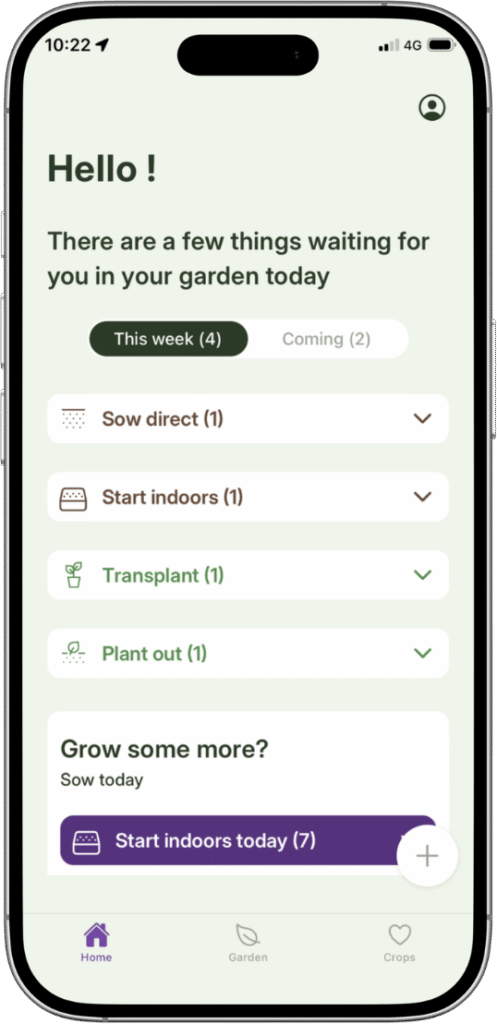
Grow To Eat opens on this week. What to sow now, the next step for everything already in the ground, and what is ready to pick — and the list is built from the date you actually sowed each crop, so when you are a fortnight late, which everyone is, the dates that follow move with you.
VegPlotter works to a month. The free plan gives you a tailored monthly jobs list drawn from your plan, which is a real feature and more than many planners offer. A month is a long time in a garden, though: sowing, potting on and planting out for the same crop can all fall inside one, and the list does not tell you which of them is due on the Saturday you have free.
The other difference is what you can do with the list. Checking jobs off as you complete them, and filtering it by plant or by plot, are on the paid plans. In Grow To Eat that is the app working normally, on the free tier.
A wider library, or a shorter one that is all food
VegPlotter carries roughly 200 plants and the range runs past the vegetable patch — fruit, herbs and ornamentals are all in there. If you are planning a plot where the flowers matter as much as the beans, that breadth is the reason to choose it.
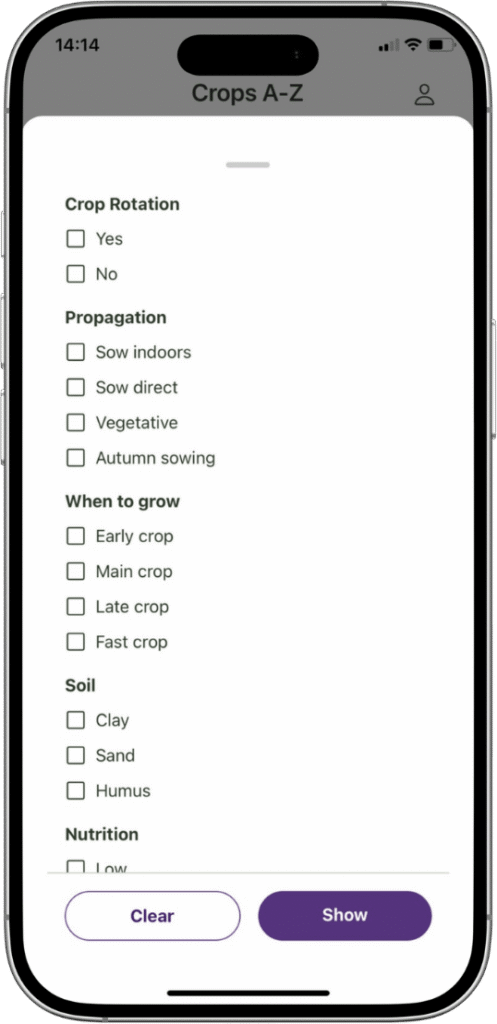
Grow To Eat carries 120+ crops and every one of them is food. That makes the list shorter and the choosing faster, and it is why the filters ask the questions a food grower asks: what will crop in partial shade, what feeds pollinators, what is forgiving in a first season. VegPlotter has no equivalent filtering.
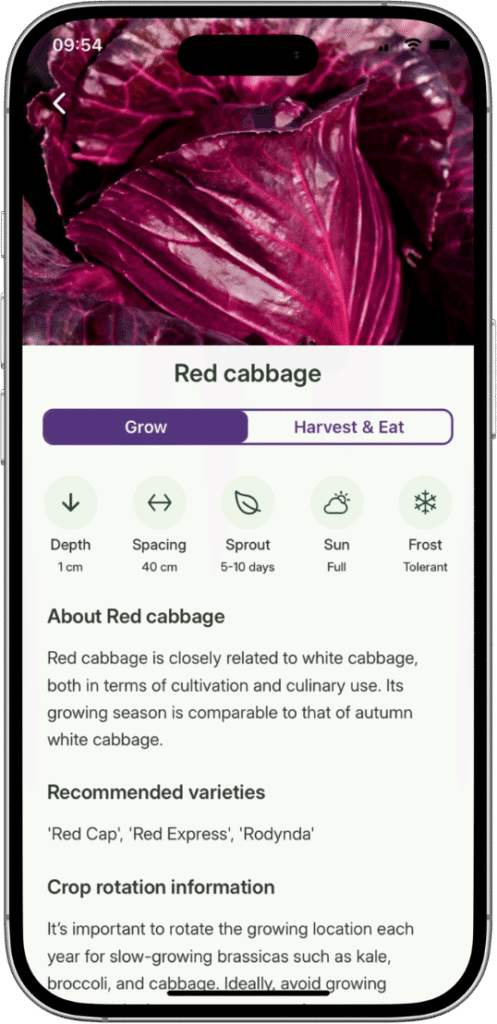
Behind each of those 120+ crops is a full A–Z guide — sowing, spacing, feeding, common problems, when to pick, and how to store or preserve what you pick. Free, with no cap on how many you read.
What you get without paying
The two free tiers are shaped differently, and which one is more generous depends on what you want from it.
Grow To Eat’s free tier gives you the whole sowing plan with no annual cap, the weekly view, notes on a plant, and every A–Z growing guide. Premium adds the visual garden planner, succession planting, custom crops and harvest tracking, at €7.49 a month or €44.99 a year.
VegPlotter’s free tier gives you the thing Grow To Eat charges for — a full drag-and-drop layout, unlimited plans of any shape, crop rotation warnings, square-foot or row beds — and caps the plantings at 40 a year. Essentials lifts that cap and unlocks job ticking, filtering, and notes and photos for $22 a year; Advanced adds custom plants and sharing for $35.
So on price Grow To Eat is the more expensive, by some distance. What the €44.99 buys that the $22 does not is the part that runs every week of the season, on a plan that keeps up with what you actually did.
A weekly list that keeps up with your garden
Free to start on iPhone and Android. Upgrade any time.
Choose VegPlotter if…
- You want the layout planner without paying for it
- You want crop rotation warnings doing the thinking for you
- You plant in square-foot beds
- You are planning a whole plot, flowers and fruit included
- You want to share the plan with a partner or plot neighbour
- Price is the deciding factor
Choose Grow To Eat if…
- You want to open an app and see what to do this week, not this month
- You sow late and want the following dates to move with you
- You want to tick jobs off without paying to do it
- You are growing food and don't need ornamentals in the way
- You want a full growing guide behind every crop, free
- You want a sowing plan with no annual cap on plantings
Grow To Eat vs VegPlotter: the bottom line
Grow To Eat is the one that keeps up with the season. A weekly list of what to sow, tend and pick, built from the dates you actually sowed, with every A–Z growing guide open on the free tier and no cap on how much you plant. The Premium tier offers a drag-and-drop planner for your garden, succession planting and to add any crop you like.
VegPlotter gives you a free drag-and-drop planner of any shape, crop rotation warnings, square-foot beds and roughly 200 plants. If you’re looking for a todo-list what you get is a monthly list, and checking jobs off it is a Premium feature.
So the question is which half of the job you want help with: drawing the plot, or keeping track ouf your vegetable garden week by week.
Frequently asked questions
Is VegPlotter free?
Which is cheaper, Grow To Eat or VegPlotter?
Does VegPlotter have a mobile app?
Can VegPlotter tell me what to do in the garden this week?
Does Grow To Eat have crop rotation?
Does Grow To Eat do square-foot gardening?
Can I share my garden plan with someone else?
What are the best VegPlotter alternatives?
Grow To Eat is built for growing food, on the phone already in your hand.
Free sowing plans and growing guides. No credit card required.
Head-to-head comparisons
Last updated: September 2026