
Grow To Eat vs Seed to Spoon: which garden planner is right for you?
Grow To Eat vs Seed to Spoon comes down to one thing: Seed to Spoon is a US zip-code planner built around an AI chatbot and a reference library, while Grow To Eat builds growing plans from your own location that work anywhere in the northern hemisphere.
Both apps help you decide what to plant and when, and both carry a similar amount of growing knowledge — 150+ foods against 120+ crops. The difference is in what they do with it. Seed to Spoon builds its calendar from your US zip code and surrounds it with recipes and a photo-based AI assistant called Growbot. Grow To Eat starts from your location, which is why it works anywhere in the northern hemisphere, and tells you what to do this week rather than only when to sow.
At a glance
What they share
- ✓Visual drag-and-drop garden bed planner (Premium in Grow To Eat)
- ✓Planting dates personalised to your location
- ✓Step-by-step growing guidance for each crop
- ✓Add your own custom crops and varieties
- ✓A genuinely usable free tier
- ✓Available on iOS and Android
Where Grow To Eat differs
- ●Sowing dates set by your location, with the rest of the plan following from them
- ●Works anywhere in the northern hemisphere: the US, Canada, the UK and Europe
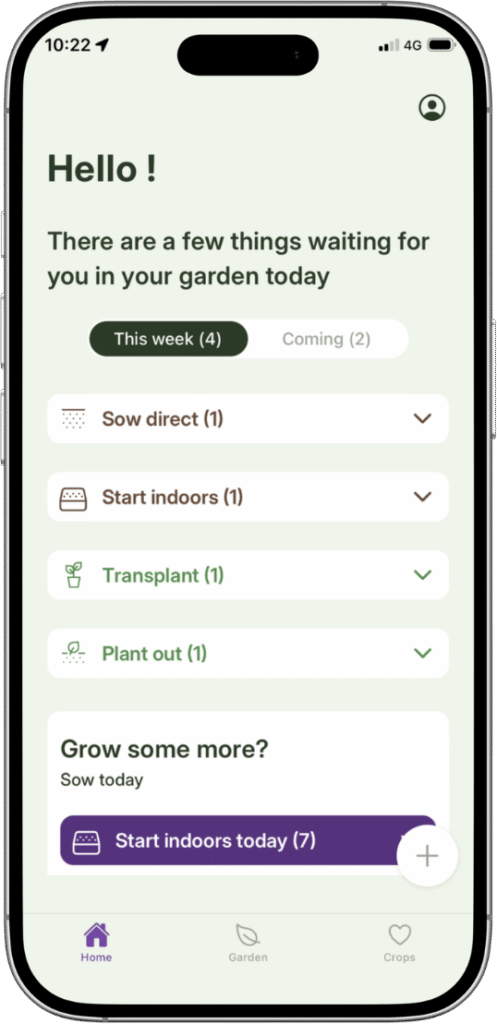
- ●A weekly “what to do now” view: sowings, next steps and harvests together
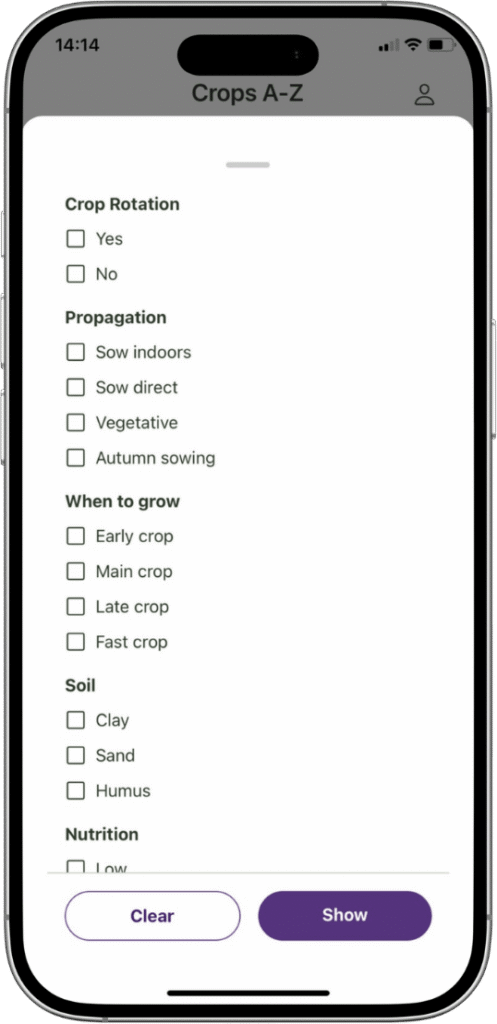
- ●Crop suggestions filtered by shade, pollinator value and difficulty
- ●Full A–Z growing guides free forever, with no daily question limits
- ●Priced in euros, with no US zip code required
Grow To Eat vs Seed to Spoon: feature comparison
| Feature | Seed to Spoon | Grow To Eat |
|---|---|---|
| Once the season starts | ||
| Weekly “what to do now” view | Partial | ✓ |
| Task list for what's due | Partial | ✓ |
| Succession planting for continuous harvest | Partial | ✓ |
| Harvest tracking | Partial | ✓ |
| Reminders for what's next | Yes — planting reminders | In-app, on the home screen |
| What you can grow | ||
| Crops in the library | 150+ foods | 120+ edible crops |
| A–Z guides: propagation to preservation | Partial | ✓ |
| Crop filters (shade, pollinators, difficulty) | Partial | ✓ |
| Perennials, berries and bushes | Partial | ✓ |
| AI chatbot with photo pest ID | ✓ | – |
| Where and how you use it | ||
| Personalised planting dates | Yes — US zip code | Yes — your location |
| Where it works | US only — manual frost dates elsewhere | Northern hemisphere, incl. US, Canada, UK, Europe |
| Platforms | iOS, Android, web | iOS, Android |
| What it costs | ||
| What's behind the paywall | Unlimited plants, photo ID, full calendar, archive | Garden planner, succession planting, custom crops |
| Free tier | 10 plants, 3 text questions/day | Uncapped sowing plan + all guides |
| Yearly price | $46.99 | €44.99 |
Prices and features checked August 2026. Seed to Spoon pricing shown in USD, Grow To Eat in EUR. Sources: . Seed to Spoon features and pricing verified against seedtospoon.net, both app store listings and an independent free-tier test, August 2026.
A sowing plan built for where you actually garden
Free sowing plans and full A–Z growing guides. No credit card required.
The key differences explained
Your location vs a US zip code
Both apps start from where you are and work forwards. Seed to Spoon takes a US zip code, using GPS for gardeners inside the United States, and calculates your planting and harvest dates from it. Inside the US that works well. Outside it, the zip code has nothing to attach to — you enter frost dates by hand, and the guidance behind them is still written around American growing conditions.
Grow To Eat takes your location instead. Your sowing dates are set from where you actually garden, and the rest of the plan — potting on, planting out, harvest — follows from those dates. Because it never depends on a national postcode system, the same approach works in Stockholm, Manchester, Toronto and Ohio without you having to look anything up.

“When to plant” vs “what to do now”
A planting calendar tells you the date. It does not tell you what the garden needs on a given Saturday morning.
Grow To Eat’s home screen pulls your planned sowings, your next steps and your upcoming harvests into one place, and separately shows which crops are good to start that week — indoors and directly outdoors. Seed to Spoon has reminders and task prompts, but the app is organised around browsing plants and their guides rather than around this week’s work.
Where each app works
This is the clearest practical difference between the two. Seed to Spoon is built around US zip codes: inside the United States it works well, and outside it you enter frost dates by hand and work from guidance written for American conditions.
Grow To Eat works anywhere in the northern hemisphere, because it starts from your location rather than a national postcode system. That covers the United States and Canada as well as the UK, the Nordics and the rest of Europe. Being built in Sweden means the short, cool seasons are handled properly too — the hardest case to get right, and the one most planners handle worst.
A focused tool, or an app that does a bit of everything
Seed to Spoon is more than a garden planner. Alongside the planting features it offers recipes and cooking videos, filters that match crops to 25+ common health concerns, weekly livestream workshops, and an AI chatbot you can ask about anything. If you want all of that in one place, it delivers.
Grow To Eat does one job: helping you actually grow food, and get more of it. Sowing plans built from your location, a weekly view of what to do next, succession planting so beds keep producing, and guides that take each crop from propagation to preservation. No recipes, no chatbot, no livestreams.
Some of what’s missing from Grow To Eat is missing on purpose. Photo journaling is the clearest example: it’s a pleasant feature, and it’s in Seed to Spoon, but keeping a scrapbook of your garden is not the same as growing more food from it. It was left out rather than left undone.
Neither approach is wrong, and the breadth is genuinely useful to some people. But an app that does one thing properly tends to keep doing it properly, and the thing Grow To Eat does is the one you opened a garden app for.
What you get without paying
The two free tiers are shaped differently, and it is worth being precise about it. Seed to Spoon’s is broad: planting dates, companion planting, reminders, growing guides, recipes and the 26 health categories are all free, and you get the visual planner as well. What is capped is size — 10 logged plants — and Growbot, which allows 3 text questions a day, with photo identification reserved for Premium at $4.99/month or $46.99/year.
Grow To Eat’s free tier is deep rather than broad: your sowing plan, the weekly view, the full A–Z growing guides and the crop suggestion filters, with no caps on any of it. The visual garden planner is the paid part — drag-and-drop beds, the bed-by-bed overview and succession planting — at €7.49/month or €44.99/year, which works out under €4 a month.
So Seed to Spoon does give you a free visual planner, which Grow To Eat does not — though at 10 logged plants it covers about one raised bed, and a kitchen garden will hit that ceiling in a single spring. Grow To Eat’s free tier caps nothing: the sowing plan, the weekly view and every growing guide stay open however much you grow. Which of those matters more depends on whether you want to lay out a garden or run one.
Know what to do in the garden this week
Free to start. Upgrade any time for the full garden planner.
Where Seed to Spoon does it better
Seed to Spoon does four things Grow To Eat does not. Three of them sit outside garden planning, which is either the appeal or the point of difference, depending on what you want from the app:
- Growbot, its AI assistant: Photograph a sick leaf or an unfamiliar insect and get an identification and organic treatment suggestions back. Grow To Eat has no equivalent. Note that photo identification is a Premium feature — the free tier allows 3 text questions a day.
- Recipes and health-focused content: Recipes with videos, and filters that let you pick crops by which of 25+ common health concerns they support. Grow To Eat has nothing equivalent.
- Community and live teaching: Weekly livestream workshops and an active community — useful if you like learning alongside other gardeners rather than reading on your own.
- A web app: Seed to Spoon runs in a browser as well as on phones. Grow To Eat is mobile only.
- Seed packet scanning: Scan a seed packet to add the variety, rather than entering it by hand.
If you want an AI assistant for diagnosing plant problems, or you enjoy the recipe and health-benefit side of growing your own food, Seed to Spoon does things Grow To Eat does not.
Choose Seed to Spoon if…
- You want an AI chatbot to identify pests and diseases from photos
- You want recipes and health-benefit information alongside growing guides
- You want to join a community with weekly live workshops
- You want to use the app in a desktop browser
- You garden in the US and want to scan seed packets to add varieties
Choose Grow To Eat if…
- You want a sowing plan built from your location, not a US postcode
- You want to open the app and see what needs doing this week
- You garden outside the US, where zip-code planting dates don't apply
- You want succession planting so beds keep producing through the season
- You want the full growing guides free, with no daily limits
Grow To Eat vs Seed to Spoon: the bottom line
The two libraries are closer than they look — 150+ foods against 120+ crops. What separates the apps is not how much they know, but what they do with it.
Seed to Spoon surrounds its library with an AI assistant, recipes, cooking videos, health-concern filters and weekly livestreams. It is the better app for browsing, researching and diagnosing problems from a photo — a gardening companion in the broadest sense.
Grow To Eat is the better plan. Sowing dates built from your location rather than a US zip code — which is why it works across the whole northern hemisphere — a weekly view that tells you what to do rather than what to read, and succession planting so beds keep producing. It does one job and puts everything into doing it well.
So the question isn’t really which app knows more. It’s whether you want a companion for the whole world of growing your own food, or a tool that gets more food out of your garden this season.
Frequently asked questions
Is Grow To Eat or Seed to Spoon better for beginners?
Does Seed to Spoon work outside the United States?
Which app is cheaper?
Does Grow To Eat have an AI plant identification feature?
Can I add my own crops and varieties?
Do I need to pay to use Grow To Eat?
What are the best Seed to Spoon alternatives?
Is Seed to Spoon worth it?
Does Grow To Eat work in the United States?
What is the best garden planner app for the UK and northern Europe?
Grow To Eat builds your plan from your location and tells you what to do next.
Free sowing plans and growing guides. No credit card required.
Head-to-head comparisons
Last updated: August 2026