
Grow To Eat vs Planter: which garden planner is right for you?
Grow To Eat plans and runs a growing season; Planter is more focues of drawing your square foot beds.
Both apps put a drag-and-drop planner on your phone and both have a free tier that never expires. They part company after planting day.
Grow To Eat carries 120+ edible crops against 80+ plants, each with a full growing guide, a weekly view of what needs sowing, tending and picking, and succession planting so beds keep producing after the first harvest. The sowing plan, the weekly view and every guide are free, with no cap.
Planter is built around the layout — a square-foot grid, 1,000+ illustrated plant tiles, companion checks — and the work it helps with is mostly done once the plan is drawn.
At a glance
What they share
- ✓Drag-and-drop garden bed planner
- ✓A planting calendar tuned to where you garden
- ✓Companion planting guidance
- ✓Add your own crops and varieties
- ✓A free tier that never expires
- ✓Native iPhone and Android apps
Where Grow To Eat differs
- ●120+ crops with full growing guides, against 80+ plants
- ●A weekly “what to do now” view, not just a plan you made in winter
- ●Guides that run from propagation through harvest to preservation
- ●Succession planting so beds keep producing after the first crop
- ●Berries, bushes and perennials included on the free tier
- ●Crop suggestions filtered by shade, pollinator value and difficulty
Grow To Eat vs Planter: feature comparison
| Feature | Planter | Grow To Eat |
|---|---|---|
| Once the season starts | ||
| Weekly “what to do now” view | – | ✓ |
| Task list for what's due | Partial | ✓ |
| Harvest tracking | – | ✓ |
| Succession planting for continuous harvest | – | ✓ |
| A–Z guides: propagation to preservation | Partial | ✓ |
| What you can grow | ||
| Crops in the library | 80+ plants | 120+ edible crops |
| Named varieties built in | 1,000+ | No — you add your own |
| Perennials, berries and bushes | Partial | ✓ |
| Crop filters (shade, pollinators, difficulty) | – | ✓ |
| Where and how you use it | ||
| Personalised planting dates | ✓ | ✓ |
| Square-foot grid | ✓ | – |
| Gardens you can create | 1 free, unlimited on Premium | 1, with unlimited beds |
| Platforms | iOS, Android, Fire, web | iOS, Android |
| What it costs | ||
| What's behind the paywall | Unlimited gardens, notes, web app | Garden planner, succession planting, custom crops |
| Free tier | 1 garden, calendar, custom plants | Uncapped sowing plan + all guides |
| Yearly price | $24.99 | €44.99 |
| Lifetime purchase | $99.99 | — |
Prices and features checked September 2026. Planter pricing shown in USD, Grow To Eat in EUR.
A plan that keeps working after planting day
Free sowing plans and full A–Z growing guides. No credit card required.
The key differences explained
Planning the garden, or running it
The first job is the one Planter is built for. You lay out beds on a square-foot grid, drop in illustrated plant tiles, check companions, and end up with a plan of the plot. Premium adds notes and events, so you can record things against the plan, but the app is built around the layout rather than around the season.
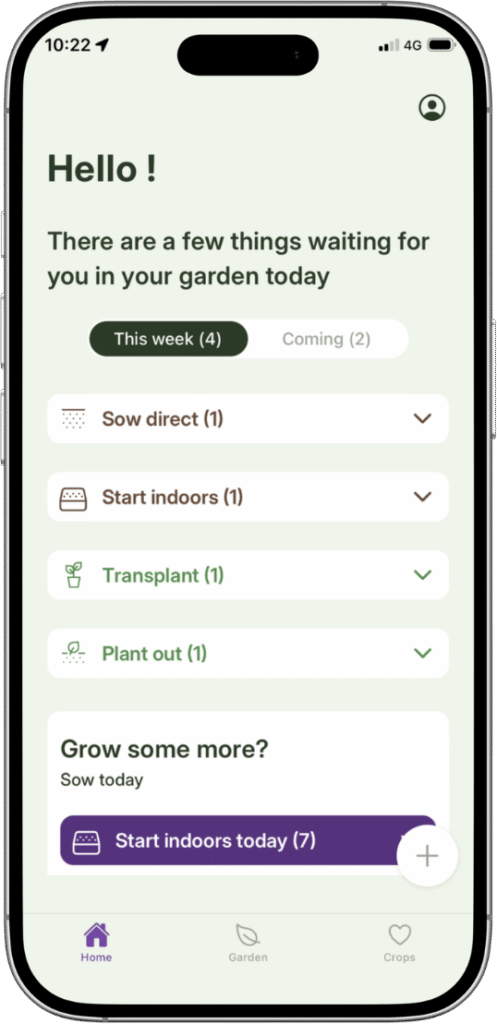
Grow To Eat is built around the second half. The home screen shows your planned sowings, the next steps due and what is ready to harvest, plus which crops are worth starting this week indoors and out. Making a plan and following one are different problems, and most garden apps only solve the first.
More crops, or more varieties
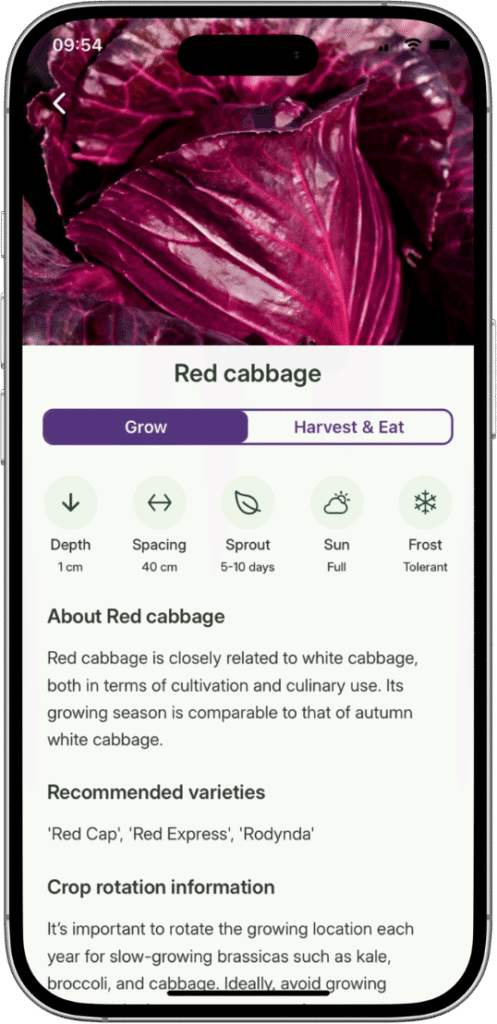
The two libraries are built to different ends. Grow To Eat has 120+ crops, and behind each one sits a full growing guide: how to propagate it, when to pot on and plant out, how to harvest, and how to store or preserve what you pick. Named varieties are left out on purpose — you add the ones you actually sow — because most gardeners grow a handful they already trust.
Planter has 80+ plants but 1,000+ named varieties, drawn as illustrated tiles you place on the grid; the library exists mainly to make the layout accurate. If you want a specific heritage variety drawn on your plan, Planter carries more of them.
What you get without paying — and what it costs after
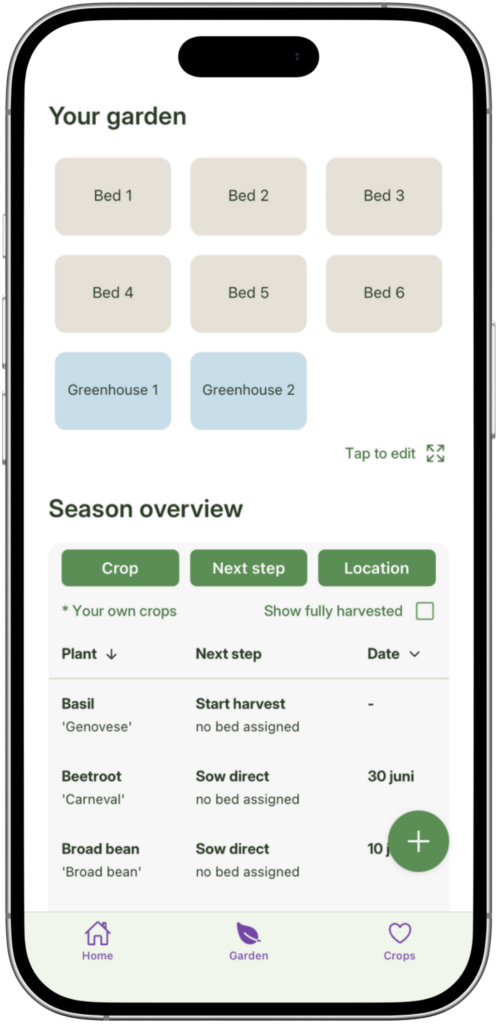
Grow To Eat’s free tier includes your sowing plan, the weekly view, every growing guide, the crop filters, and perennials, berries and bushes, none of it capped. The garden planner is the Premium part. Planter’s free tier includes one garden on the square-foot grid, the planting calendar, custom plants and a seed box.
On yearly price Planter is the cheaper: $24.99 a year, or $99.99 once. Grow To Eat is €7.49 a month or €44.99 a year, with no lifetime option. The two free tiers are shaped differently — one gives you a layout, the other gives you the whole season’s plan and every guide — so the question is which half of the job you would be paying for.
Know what to do in the garden this week
Free to start on iPhone and Android. Upgrade any time.
Choose Planter if…
- You want a square-foot grid with illustrated plant tiles
- You want to spend as little as possible, or buy once for life
- You want a free garden layout without paying anything
- You plan by named variety and want a thousand to choose from
- You want it on a desktop browser or an Amazon Fire tablet
Choose Grow To Eat if…
- You want a weekly view of what needs sowing, doing and harvesting
- You want full growing guides for each crop, not just a tile on a grid
- You want succession planting so beds keep producing
- You want harvest tracking without paying for it
- You are still learning how to grow some of what you are planting
Grow To Eat vs Planter: the bottom line
Grow To Eat is the one to pick if you want the plan to keep working after planting day: 120+ crops with a full growing guide behind each, a weekly view of what needs sowing, tending and picking, harvest tracking and succession planting — with the sowing plan, the weekly view and every guide free and uncapped.
Planter costs less, at $24.99 a year or $99.99 once, and its square-foot grid with 1,000+ illustrated varieties is the better tool for laying out a plot and nothing else.
One of them helps you decide what goes where. The other tells you in a better way what to do about it week-by-week.
Frequently asked questions
Which is better, Grow To Eat or Planter?
Is Grow To Eat free?
Does Grow To Eat tell you what to do during the season?
What does each one cost?
Which has more plants?
Does Grow To Eat have a free garden planner?
Can I use Grow To Eat without drawing my garden first?
What are the best Planter alternatives?
Grow To Eat stays useful all season, not just in planning week.
Free sowing plans and growing guides. No credit card required.
Head-to-head comparisons
Last updated: September 2026